The application cnetstats has the ability to generate Statistics and apply
filters on a Control Network and the results are saved to specified output
file in CSV (Comma Separated Value) format.
Application takes in as input the Control Net CNET and its
corresponding images list FROMLIST. FROMLIST contains the filenames of all
the images that are part of the input Control Net. When application is run
it will generate a Control Net Statistics in PVL format. This is displayed
in the Application Gui and also logged in the print.prt file. The Control
Net Statistics are generated for all the Points in the Control Net
irrespective of all the different options chosen.
Following is the Control Net Statistics format:
|
| Group = ControlNetSummary |
| TotalImages |
= Positive Integer |
| ImagesInControlNet |
= Positive Integer |
| TotalPoints |
= Positive Integer |
| ValidPoints |
= Positive Integer |
| IgnoredPoints |
= Positive Integer |
| FixedPoints |
= Positive Integer |
| ConstrainedPoints |
= Positive Integer |
| FreePoints |
= Positive Integer |
| EditLockPoints |
= Positive Integer |
| TotalMeasures |
= Positive Integer |
| ValidMeasures |
= Positive Integer |
| IgnoredMeasures |
= Positive Integer |
| EditLockMeasures |
= Positive Integer |
| AvgResidual |
= Double |
| MinResidual |
= Double |
| MaxResidual |
= Double |
| MinLineResidual |
= Double |
| MaxLineResidual |
= Double |
| MinSampleResidual |
= Double |
| MaxSampleResidual |
= Double |
| MinLineShift |
= Double |
| MaxLineShift |
= Double |
| MinSampleShift |
= Double |
| MaxSampleShift |
= Double |
| AvgPixelShift |
= Double |
| MinPixelShift |
= Double |
| MaxPixelShift |
= Double |
| MinGoodnessOfFit |
= Double |
| MaxGoodnessOfFit |
= Double |
| MinEccentricity |
= Double |
| MaxEccentricity |
= Double |
| MinPixelZScore |
= Double |
| MaxPixelZScore |
= Double |
| MinConvexHullRatio |
= Double |
| MaxConvexHullRatio |
= Double |
| AvgConvexHullRatio |
= Double |
| EndGroup | |
|
Additional Statistics can be generated if required based on Images and/or
Control Points into the user specified output file.
1. Image
Stats provides Statistics based on Images in the Control Net. To generate
Image Stats report, click on the option CREATE_IMAGE_STATS
which will enable IMAGE_STATS_FILE option. Image Stats are generated in CSV
format in the output file specified in the option IMAGE_STATS_FILE. It also
reports images that are part of the input list but not in the Control Net.
For images that are not part of the Control Net, the image stats would be
zero.
Following is the Image Stats information in CSV format:
| Filename | SerialNumber | ImageTotalPoints |
ImagePointsIgnored | ImagePointsEditLocked | ImagePointsFixed | ImagePointsConstrained | ImagePointsFree |
ImageConvexHullRatio |
2. Point Stats provides statistics based on Control Points in the
Control Net. To generate the Point Stats report, click on the
CREATE_POINT_STATS option which will enable POINT_STATS_FILE option. Point
Stats are generated in CSV format in the output file specified in the option
POINT_STATS_FILE. Following are the information generated by this
option:
| PointId | PointType | PointIgnored | PointEditLocked | TotalMeasures |
MeasuresValid | MeasuresIgnored | MeasuresEditLocked |
cnetstats also has the option to Filter the input ControlNet based on
different Filters. To apply Filters, the FILTER option must be enabled and
the Filters in PVL format must be provided in the DEFFILE. The results of
the Filters will be placed in the specified output file FLATFILE in CSV
format. Each Filter has its own custom report format and hence the output
format is different depending on the last Filter used.
Note:The Points and Measure with EditLocks will always be
filtered in irrespective of the filter settings.
The DEFFILE contains the PVL filters in the following format:
| Object = Filters |
| Group = FilterName1 |
| |
option = value |
| EndGroup |
| Group = FilterName2 |
| |
option = value |
| EndGroup |
| EndObject |
|
The DEFFILE is validated upfront before any processing to save time involved
in reading a Control Net. It is important that the DEFFILE adheres to the
specified format. The DEFFILE can contain as many filters as available and
the application will apply the filters sequentially in the First In First
Out fashion. The output of the previous Filter will be the input for the
current Filter. The report generated will be based on the last Filter run on
the Control Net. It should also be noted that a Filter can be defined only
once in a DEFFILE that means it can be run only once during an execution of
cnetstats. If the Filter needs to be run again, the application must be run
again with this Filter in the DEFFILE.
In any given Filter if it requires options LessThan/GreaterThan
the values will always be inclusive. For example, in measures Filter, if
LessThan = 3 and GreaterThan =1, cnetstats will find all the Control Points
with Control Measures >= 1 and <=3.
There are 2 kinds of Filters, Point Filters and Cube Filters.
Following are the
Point Filters:
1.
ResidualMagnitude
2.
Id
3.
Measures
4.
Properties
5.
Latitude Longitude Range
6.
Distance
7.
Measure Properties
8.
Cube Names(Serial Number)
9.
EditLock
10.
Measures EditLock
11.
Pixel Shift
12.
Goodness of Fit
Following are the
Cube Filters:
1.
Name
2.
Number of Points
3.
Distance
4.
Convex Hull Ratio
The Format for the output files will be in Comma Separated
Value(CVS).
1.
ResidualMagnitude - Filter the ControlNet by
Control Point ResidualMagnitude. This Filter, filters all the Control
Points which have atleast one Control Measure in the specified range.
Options LessThan and GreaterThan can be combined which will be applied as a
Range or used alone. These values will always be inclusive. To omit an
option, it can be deleted from the group.
| Object = Filters |
|
Group = Point_ResidualMagnitude |
| |
LessThan = Double |
| |
GreaterThan = Double |
| EndGroup |
| EndObject |
|
Report Format:
| PointID | PointType | PointIgnored | PointEditLocked | Filename |
SerialNumber | ResidualMagnitude | MeasureType | MeasureIgnored | MeasureEditLocked |
Reference |
2.
Id - Filter the Control Net by the specified
Control Point Id Expression. Wildcard '*' is allowed any number of times in
the Expression. This filters all the Control Points matching the
expression.
| Object = Filters |
|
Group = Point_IdExpression |
| |
Expression = String |
| EndGroup |
| EndObject |
|
Report Format:
| PointID | PointType | PointIgnored | PointEditLocked | TotalMeasures |
MeasuresIgnored | MeasuresEditLocked |
3.
Measures - Filter the Control Net by the
specified number of Control Measures in a Control Point. Options LessThan and GreaterThan can be combined which will be applied as a
Range or used alone. These values will always be inclusive. To omit an
option, it can be deleted from the group.
| Object = Filters |
|
Group = Point_NumMeasures |
| |
LessThan = Positive Integer |
| |
GreaterThan = Positive Integer |
| EndGroup |
| EndObject |
|
Report Format:
| PointID | PointType | PointIgnored | PointEditLocked | TotalMeasures |
MeasuresIgnored | MeasuresEditLocked | Filename | SerialNumber | MeasureType |
MeasureIgnored | MeasureEditLocked | Reference |
4.
Properties - Filter the Control Net by
Control Point Properties "Ignore" and/or Type "Fixed", "Constrained",
"Free". If both Control Point Type and Ignore is used, then the Filter will
filter Control Points of the specified type and ignore flag. Options can be
combined. To omit an option, it can be set to "false" or just deleted from
the group.
| Object = Filters |
|
Group = Point_Properties |
| |
PointType =All / Fixed / Constrained / Free |
| |
Ignore = true/false |
| EndGroup |
| EndObject |
|
Report Format:
| PointID | PointType | PointIgnored | PointEditLocked | TotalMeasures |
MeasuresIgnored | MeasuresEditLocked |
5.
Latitude Longitude Range - Filter the Control
Net by Control Points location (Latitude/Longitude). Control Points in the
specified Minimum and Maximum Latitude/Longitude Range are filtered. The
Filter Options can be combined. To omit an option, it can be deleted from
the group. Note that any unset value will default to Minimum and Maximum
double value.
| Object = Filters |
|
Group = Point_LatLon |
| |
MinLat = Double |
| |
MaxLat = Double |
| |
MinLon = Double |
| |
MaxLon = Double |
| EndGroup |
| EndObject |
|
Report Format:
| PointID | PointType | PointIgnored | PointEditLocked | TotalMeasures |
MeasuresIgnored | MeasuresEditLocked | Latitude | Longitude | Radius |
6.
Distance - Filter the Control Net by the
specified distance between the Control Points. All the Control Points which
are less than or equal to the specified distance will be filtered. The units
can be in pixels/meters and the output distance will be in the specified
units. Default is pixels.
| Object = Filters |
|
Group = Point_Distance |
| |
MaxDistance = Double |
| |
Units = meters/pixels |
| EndGroup |
| EndObject |
|
Report Format: Displays the Control Point information and a field
Point#Distance. This field has the Control Point ID and the distance. This
indicates the distance of the current Control Point from the Control Point
in Point#Distance
| PointID | PointType | PointIgnored | PointEditLocked | TotalMeasures |
MeasuresIgnored | MeasuresEditLocked | Point#Distance >> |
7.
Measure Properties - Filter the Control
Net by Control Measure properties like Ignore and/or Measure Type (Manual,
Estimated, Auto-Registered, Manual_Validated, AutoReg_Validated). There is
an option "All" to include all Control Measure Types. To omit an option, it
can be set to "false" or just deleted from the group.
| Object = Filters |
|
Group = Point_MeasureProperties |
| |
MeasureType = All / Manual/Estimated / Auto-Registered /
Manual_Validated / AutoReg_Validated |
| |
Ignored = true/false |
| EndGroup |
| EndObject |
|
Report Format:
| PointID | PointType | PointIgnored | PointEditLocked | TotalMeasures |
MeasuresIgnored | MeasuresEditLocked | FileName | SerialNumber | MeasureIgnored | MeasureType | MeasureEditLocked |
Reference |
8.
Cube Names (Serial Number) - Filter the
Control Net by Cube Serial Number. Only the Control Points with the
specified Image as one of their Measures will be Filtered in. Any number of
Cubes can be entered with "Cube=". The report will also display the Image
information for all the other Control Measures in the filtered Control
Points.
| Object = Filters |
|
Group = Point_CubeNames |
| |
Cube = Serial Number1 |
| |
Cube = Serial Number2 |
| EndGroup |
| EndObject |
|
Report Format:
| PointID | PointType | PointIgnored | PointEditLocked | TotalMeasures |
MeasuresIgnored | MeasuresEditLocked | FileName | SerialNumber | ImageTotalPoints |
ImagePointsIgnored | ImagePointsEditLocked | ImagePointsFixed | ImagePointsConstrained | ImagePointsFree |
ImageConvexHullRatio | ImageMeasureIgnored | ImageMeasureEditLocked |
9.
Point EditLock - Filter the
Control Net for all Control Points that have EditLock set to user specified
true/false.
| Object = Filters |
|
Group = Point_EditLock |
| |
EditLock = true/false |
| EndGroup |
| EndObject |
|
Report Format:
| PointID | PointType | PointIgnored | PointEditLocked | TotalMeasures |
MeasuresIgnored | MeasuresEditLocked |
10.
Measure EditLock - Filter the ControlNet
for all Control Points that have the number of Control Measures with the
EditLock in the user specified range. Options LessThan and GreaterThan can be combined which will be applied as a
Range or used alone. These values will always be inclusive. To omit an
option, it can be deleted from the group.
| Object = Filters |
|
Group = Point_NumMeasuresEditLock |
| |
LessThan = Positive Integer |
| |
GreaterThan = Positive Integer |
| EndGroup |
| EndObject |
|
Report Format:
| PointID | PointType | PointIgnored | PointEditLocked | TotalMeasures |
MeasuresIgnored | MeasuresEditLocked | Filename | SerialNumber | MeasureType |
MeasureIgnored | MeasureEditLocked | Reference |
11.
Pixel Shift - Filter the ControlNet for
all Control Points whose maximum pixel shift are in the user specified
range. These values will always be inclusive. Options LessThan and
GreaterThan can be combined which will be applied as a Range or used alone.
To omit an option, it can be deleted from the group.
| Object = Filters |
|
Group =Point_PixelShift |
| |
LessThan = Double |
| |
GreaterThan = Double |
| EndGroup |
| EndObject |
|
Report Format:
| PointID | PointType | PointIgnored | Filename | SerialNumber |
PixelShift | MeasureType | MeasureIgnored | MeasureEditLocked | Reference |
12.
Goodness Of Fit - Filter the
ControlNet by Control Measure's GoodnessOfFit. These values will
always be inclusive. Options LessThan and GreaterThan can be combined which
will be applied as a Range or used alone. To omit an option, it can be
deleted from the group.
| Group = Point_GoodnessOfFit |
| LessThan = Double |
| GreaterThan = Double |
| EndGroup |
|
Report Format:
| PointID | PointType | PointIgnored | PointEditLocked |
TotalMeasures | MeasuresIgnored | MeasuresEditLocked |
FileName | SerialNumber | GoodnessOfFit | MeasureType |
MeasureIgnored | MeasureEditLocked | Reference |
Following are the
Cube Filters:
1.
Name - Filter the Control Net by the Cube
Serial Number Expression. Wildcard '*' is allowed any number of times in the
Expression. All the Control Points which have the cubes with Serial Numbers
matching the expression will be filtered.
| Object = Filters |
|
Group = Cube_NameExpression |
| |
Expression = String |
| EndGroup |
| EndObject |
|
Report Format:
| FileName | SerialNumber | ImageTotalPoints |
ImagePointsIgnored | ImagePointsEditLocked | ImagePointsFixed |
ImagePointsConstrained | ImagePointsFree | ImageConvexHullRatio |
2.
Number of Points - Filter the Control Net
for all the Cubes/Images by the user specified number of Control Points in
each Cube. All the Cubes which have the user specified number of Control
Points will be filtered. These values will always be inclusive. Options
LessThan and GreaterThan can be combined which will be applied as a Range or
used alone. To omit an option, it can be deleted from the group.
| Object = Filters |
|
Group = Cube_NumPoints |
| |
LessThan = Positive Integer |
| |
GreaterThan =Positive Integer |
| EndGroup |
| EndObject |
|
Report Format:
| FileName | SerialNumber | ImageTotalPoints |
ImagePointsIgnored | ImagePointsEditLocked | ImagePointsFixed |
ImagePointsConstrained | ImagePointsFree | ImageConvexHullRatio |
3.
Distance - Filter the Control Net by the
specified distance between the Control Points in an Image. All the Images
which have Points which are <= to the specified distance between them
will be filtered in. The units can be in pixels/meters. Default is pixels.
| Object = Filters |
|
Group = Cube_Distance |
| |
MaxDistance = Double |
| |
Units = meters/pixels |
| EndGroup |
| EndObject |
|
Report Format:
| FileName | SerialNumber | ImageTotalPoints |
ImagePointsIgnored | ImagePointsEditLocked | ImagePointsFixed |
ImagePointsConstrained | ImagePointsFree | ImageConvexHullRatio |
Distance_PointIDs >> |
4.
Convex Hull Ratio - Filter the Control
Net for all the Cubes/Images by the user specified Convex Hull Ratio of all
valid Control Points in each Cube.
| 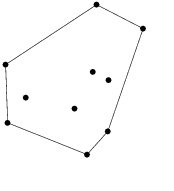 |
The convex hull or convex envelope for a set of points X in a real vector
space V is the minimal convex set containing X.
ConvexHullRatio = Convex Hull / Image Area. |
All the Cubes whose ConvexHullRatio is in the specified range will be
filtered in. These values will always be inclusive. Options LessThan and
GreaterThan can be combined which will be applied as a Range or used alone.
To omit an option, it can be deleted from the group.
| Object = Filters |
|
Group = Cube_ConvexHullRatio |
| |
LessThan = Positive double |
| |
GreaterThan =Positive double |
| EndGroup |
| EndObject |
|
Report Format:
| FileName | SerialNumber | ImageTotalPoints |
ImagePointsIgnored | ImagePointsEditLocked | ImagePointsFixed |
ImagePointsConstrained | ImagePointsFree | ImageConvexHullRatio |