




equalizer
Tone matches map projected cubes
This program tone matches or equalizes the brightness and/or contrast of a list of input cubes prior to mosaicking. All the input cubes, including mosaics, must be in identical map projection since equalizer uses the mapping information to gather statistics in overlapping areas.
Statistic gathering is done on a band-by-band basis. The statistics are used in a least squares solution to determine multiplicative (GAIN or MULT) and additive (OFFSET or BASE) corrections for each image. In addition to simply calculating corrective factors and applying said factors to each image (BOTH), the user has the option to only calculate statistics (CALCULATE) and then examine these gathered statistics in a text file (OUTSTATS). Then, equalizer can be run again using that statistics file as input (INSTATS) to apply correction to any or all of the images without the need to calculate corrective factors again.
Corrective factors will be undetermined if there are insufficient valid overlaps or if there are any images that have no overlaps. If an output statistics file is provided (OUTSTATS), images that do not overlap will appear in the file.
When corrective factors are undetermined, the user can use the RECALCULATE process option to try to solve them. To do this, images can be added to the input list to try to create more overlaps or images without overlaps can be removed. An input statistics file (INSTATS) containing previously calculated image statistics must be provided. These statistics will be reloaded so overlap statistics will only be recalculated for new images in the modified input list. If all the images have overlaps and sufficient valid overlaps exist, corrective factors will be determined. Statistics can be recalculated as many times as desired by repeating the above steps.
Additionally, the RETRYBOTH process option may be used to recalculate statistics and then apply corrective factors. This requires the user to provide an INSTATS file containing previously calculated statistics. It is also suggested that the user provide an OUTSTATS file in case corrective factors cannot be determined. If the corrective factors are determined, they will then be applied to the input images.
The addition of these RETRYBOTH and RECALCULATE parameters has modified the content of the output statistics. Additional information is included in the output statistics so that previously calculated overlap statistics can be reloaded when using these parameters. Note that statistics files created with previous versions of ISIS can still be used as input statistics.
The actual equation to be used for equalization, for ADJUST=BRIGHTNESS, CONTRAST or BOTH, on each band in each cube is as follows:
newdn(s,l,b) = (olddn(s,l,b) - avg(b)) * GAIN(b) + (avg(b) + OFFSET(b))
where
        s = sample index
        l = line index
        b = band index
The actual equation to be used for equalization, for ADJUST=GAIN, on
each band in each cube is
newdn(s,l,b) = olddn(s,l,b) * GAIN(b)
where
        s = sample index
        l = line index
        b = band index
Prior to equalizing, the user can choose whether to adjust the brightness and/or contrast of the cubes. The default is to adjust both; however, if the brightness (average) of all the cubes is the same, then simply adjusting the contrast may suffice. Likewise, if the standard deviation of all the cubes is similar, then a contrast adjustment is not necessary. Adjusting for contrast only implies the OFFSET values will be held to zero. Similarly, adjusting for brightness implies the GAIN values will be held to one.
The OFFSET and GAIN values are computed independently for each image, therefore we have two least squares computations with N unknowns, where N is the number of cubes to be equalized. The overlaps, M, between all the cubes are computed, and in some cases M < N. This implies an underdetermined system, and the program will report an error if this occurs. You can hold one or more images to alleviate this problem. Holding an image forces GAIN and OFFSET to 1.0 and 0.0 for that image, respectively.
If the user chooses to apply correction to the images, then a list of output file names can be specified with the TOLIST parameter. If no TOLIST is specified, the equalized cubes will be named the same as the input cubes with the addition of '.equ' prior to the '.cub' extension, and placed in the same directories as their input files.
For the sake of efficiency, the user may choose to set the "sampling percent" to be less than its default value of 100.0. By doing so, the program will likely perform its statistic gathering noticeably faster, but at the risk of losing accuracy in the results. It should be noted that the user also runs the risk of encountering an error if decreasing the sampling percent results in the amount of valid data in the calculated overlaps being less than the minimum set by the MINCOUNT parameter (default value of 1000). Sampling percent must be a decimal value between 0.0 (exclusive) and 100.0 (inclusive).
This program defaults to solving the least-squares system using the SPARSE matrix method. This method is able to find valid solutions, even when no hold list is provided. The QRD method is fairly accurate and fast, but does not produce valid results in all cases, especially if no images are held. Previous versions of equalizer used this method to solve.
Categories
Related Applications to Previous Versions of ISIS
This program replaces the following application existing in previous versions of ISIS:- b4equal
History
| Kay Edwards | 1994-05-24 | Original version. |
| Elizabeth Ribelin | 2005-06-25 | Ported to Isis 3.0. |
| Elizabeth Ribelin | 2005-10-04 | Changed categoryItem to Photometry and Radiometry. |
| Brendan George | 2005-11-07 | Added application test. |
| Elizabeth Miller | 2006-01-12 | Made SD default contrast mode (PCA may have errors). |
| Jeff Anderson | 2007-07-16 | Fixed memory leak. |
| Jeff Anderson | 2008-04-09 | Modified to solve system using QRD which is faster the SVD. |
| Steven Lambright | 2008-05-12 | Removed references to CubeInfo. |
| Tracie Sucharski | 2008-06-12 | Modified call LeastSquares Solve due to change to LeastSquares Solve method. |
| Travis Addair | 2009-03-12 | Added user feedback during statistic gathering, modified existing progress information, and moved error checking on number of bands and projection parameters to be done prior to statistic gathering. |
| Travis Addair | 2009-06-24 | Refactored for use with the new OverlapNormalization class, thus removing the option to use the broken PCA contrast mode; the PVL output has been modified to print all normalization information for a cube in one group with OverlapStatistics information coming last in the file; added an option to decrease the percentage of lines sampled in statistic gathering. |
| Travis Addair | 2009-07-17 | Added a TOLIST parameter, allowing the user to specify a unique output file name and location for each input file. The default is now to place each output file in the same directory as its input file, not in the current working directory. |
| Travis Addair | 2009-07-30 | Added functionality allowing the user to run the program applying corrections based off of previously gathered statistics obtained from the program's output PVL file. The output PVL has also been changed from "PVL" to "OUTSTATS". Results will now be placed into the print file. |
| Travis Addair | 2009-11-19 | Updated documentation and examples to reflect the most recent changes to using the program. |
| Jeannie Backer | 2013-01-29 | Added parameter SOLVEMETHOD to allow user to choose the method in which the system of equations will be solved. Removed unnecessary error throws from implementation file, now use xml to require OUTSTATS when PROCESS=CALCULATE and require the PERCENT entered to be in the interval (0, 100]. Improve test coverage to 100%. Fixes #962. |
| Jeannie Backer | 2013-02-04 | Removed SVD option from the SOLVEMETHOD parameter since this option is not producing correct results on MAC OS, see mantis ticket #1472. If this bug is fixed and the option is reimplemented, the noHoldCalculateSparse test data can be used to test the SVD method. Also, the documentation about this method should be uncommented in the general description of the program, in the QRD description. References #962. |
| Steven Lambright | 2013-02-06 | Added the option "ADJUST=GAIN" based on a prototype developed by Jeff Anderson. Fixes #911. |
| Jeannie Backer | 2013-02-27 | Fixed user documentation. References #962. |
| Ian Humphrey | 2016-07-15 | Added RETRYBOTH and RECALCULATE parameters to allow user to fix any non-overlapping images in the input image list and recalculate statistics for any new images in the input list, reusing previously calculated statistics for the rest of the images. Fixes #2282. |
| Christopher Combs | 2017-05-19 | Changed pvl.DIFF of input for app tests nonOverlapRecalculate and nonOverlapRetryBoth to ignore file names. Allows test to pass when not using default data area. Fixes #4738. |
| Jesse Mapel | 2020-09-01 | Reported formula and variables now match the formula selected by the ADJUST argument. Fixes #3987. |
Parameters
Files
| Type | filename |
|---|---|
| File Mode | input |
| Type | filename |
|---|---|
| File Mode | input |
| Internal Default | None |
| Filter | *.txt *.lis *.lst |
| Type | filename |
|---|---|
| File Mode | input |
| Internal Default | Automatic |
| Type | filename |
|---|---|
| File Mode | output |
| Internal Default | None |
| Filter | *.txt *.pvl *.lis *.lst *.dat |
| Type | filename |
|---|---|
| File Mode | input |
| Filter | *.txt *.pvl *.lis *.lst *.dat |
ProcessingOptions
| Type | string | ||||||||||||||||||
|---|---|---|---|---|---|---|---|---|---|---|---|---|---|---|---|---|---|---|---|
| Default | BOTH | ||||||||||||||||||
| Option List: |
|
| Type | string | |||||||||
|---|---|---|---|---|---|---|---|---|---|---|
| Default | SPARSE | |||||||||
| Option List: |
|
CalculationOptions
| Type | string | |||||||||||||||
|---|---|---|---|---|---|---|---|---|---|---|---|---|---|---|---|---|
| Default | BOTH | |||||||||||||||
| Option List: |
|
| Type | integer |
|---|---|
| Default | 1000 |
| Type | boolean |
|---|---|
| Default | FALSE |
| Type | double |
|---|---|
| Default | 100.0 |
| Minimum | 0.0 (exclusive) |
| Maximum | 100.0 (inclusive) |
Example 1
Calculate Statistics and Apply Correction
Command Line
equalizer fromlist= FromList.lst holdlist= HoldList.lst
GUI Screenshot
Example GUI
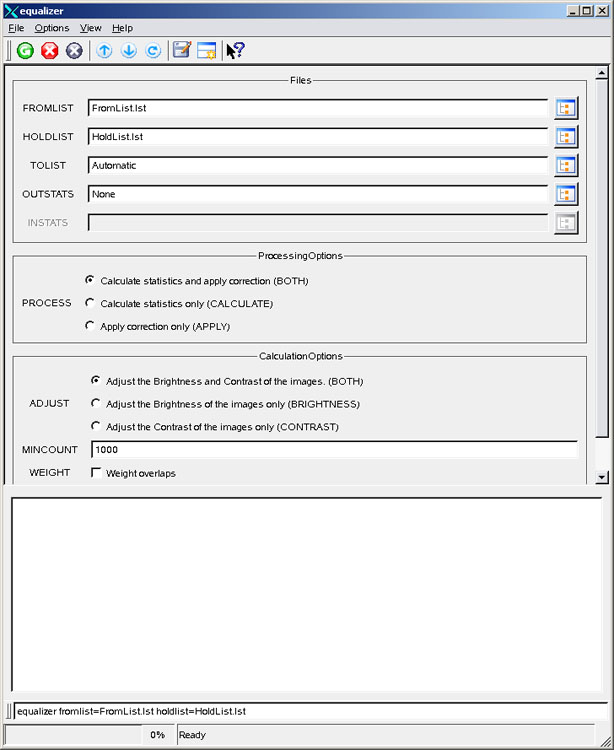
Equalizer GUIScreenshot of the GUI with parameters set to calculate the gain and offset and then to apply corrections. Because the TOLIST parameter is set to its default value of "Automatic," each output image will be placed into the directory of its corresponding input image. Also, because the OUTSTATS parameter is set to its default value of "None", a record of the calculations performed will only be written to the print file.
Input Image
Mosaic of the input images for equalizer
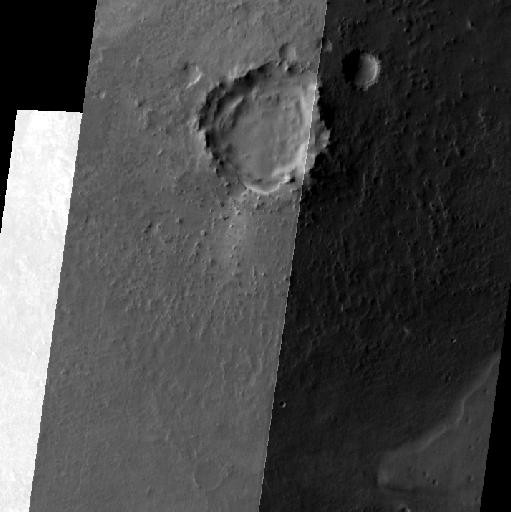
Mosaic of unequalized input images
Parameter Name:
FROMLIST
This is a small section of the input images for the equalizer example mosaicked together.
Data Files
Links open in a new window.| Click here to see the list of input images to be equalized | This list contains the names of three files to calculate statistics upon, and then equalize. The file names are separated by new lines. |
|---|---|
| Click here to see the list of input images to be held | This list contains the name of one file from the FROMLIST to be held during calculations. When multiple images are held, their file names are likewise separated by new lines. |
Output Image
Mosaic of the output images for equalizer
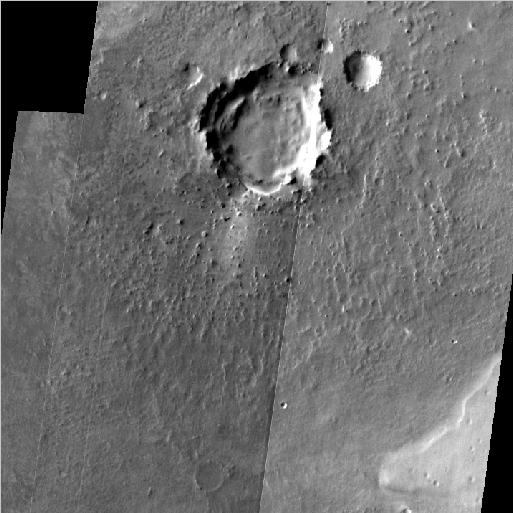
Mosaic showing results of the equalizer application.
Parameter Name:
TOLIST
This is a small section of the equalized output images mosaicked together.
Example 2
Calculate Statistics
Command Line
equalizer  fromlist= FromList.lst holdlist=/HoldList.lst
          outstats= stats.pvl process= calculate
GUI Screenshot
Example GUI
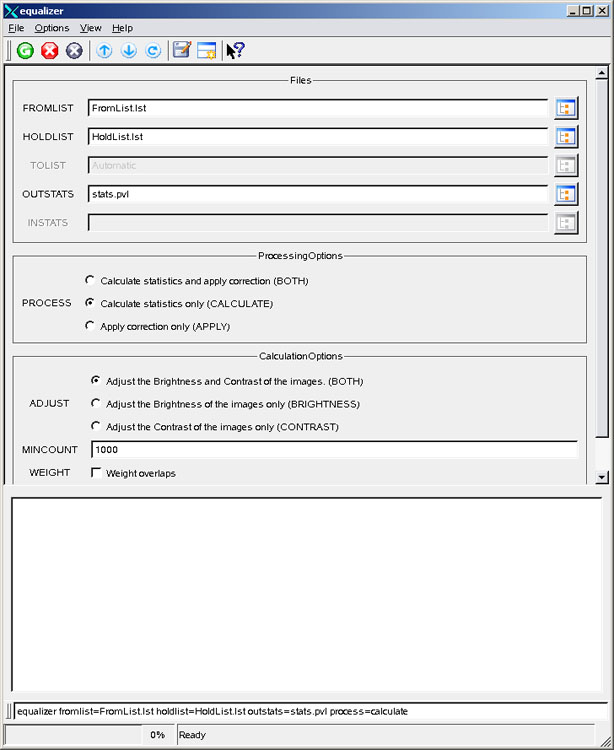
Equalizer GUIScreenshot of the GUI with parameters set to calculate equalization statistics on a set of input images.
Input Image
Mosaic of the input images for equalizer
Mosaic of unequalized input images.
Parameter Name:
FROMLIST
This is a small section of the input images for the equalizer example mosaicked together.
Data Files
Links open in a new window.| Click here to see the list of images to calculate statistics upon | This list contains the names of three files to calculate statistics upon. The file names are separated by new lines. |
|---|---|
| Click here to see the list of input images to be held | This list contains the name of one file from the FROMLIST to be held during calculations. When multiple images are held, their file names are likewise separated by new lines. |
| Click here to see the output text file containing statistics for equalizing | This PVL file contains thorough equalization-related statistics that can be used for applying correction to any or all images used to generate this file. |
Example 3
Apply Correction
Command Line
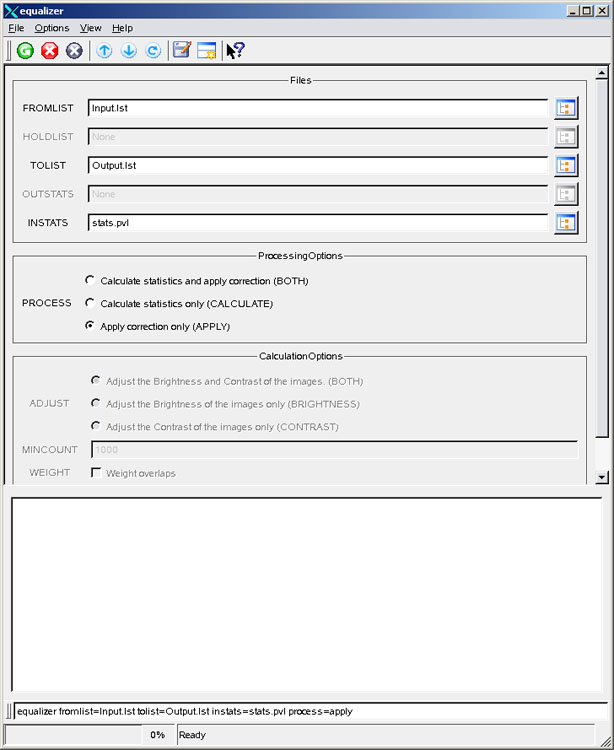
equalizer  fromlist= Input.lst tolist= Output.lst instats=
          stats.pvl process= apply
GUI Screenshot
Example GUI
Equalizer GUIScreenshot of the GUI with parameters set to apply correction to a subset of the images used to produce a specified input statistics file.
Data Files
Links open in a new window.| Click here to see the list of images to be equalized | This list contains the names of two files to equalize. Both file names appear in the FROMLIST file from the previous example, and both file names have calculated gain and offset coefficients calculated for them in the INSTATS file. Since we do not wish to create a new file for the held image, however, we chose not to include it in this new list. The file names are separated by new lines. |
|---|---|
| Click here to see the list of images to write after equalization | This list contains the names of two files to be written as outputs from the equalization process. The index of each file name corresponds to the index of a file from this example's FROMLIST file. Here, the output images retain their original names, but are written to the current directory. |
| Click here to see the input text file containing statistics for equalizing | This PVL file contains thorough equalization-related statistics for applying correction to any or all images used to generate this file. In this example, two of the three files used to generate these statistics have been selected for equalization. |
Output Image
Mosaic of the output images for equalizer
Mosaic showing results of the equalizer application.
Parameter Name:
TOLIST
This is a small section of the equalized output images and the held image from Example 2 mosaicked together. Note that since we only chose to omit the held image from Example 2 when applying correction, that the results are the same as those in Example 1.
Example 4
Recalculate Statistics
Command Line
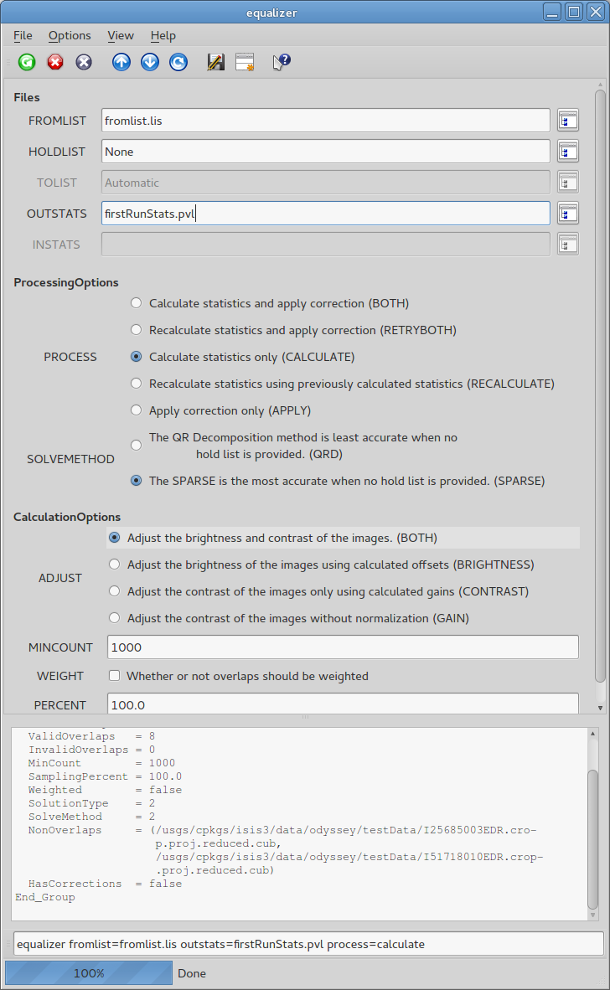
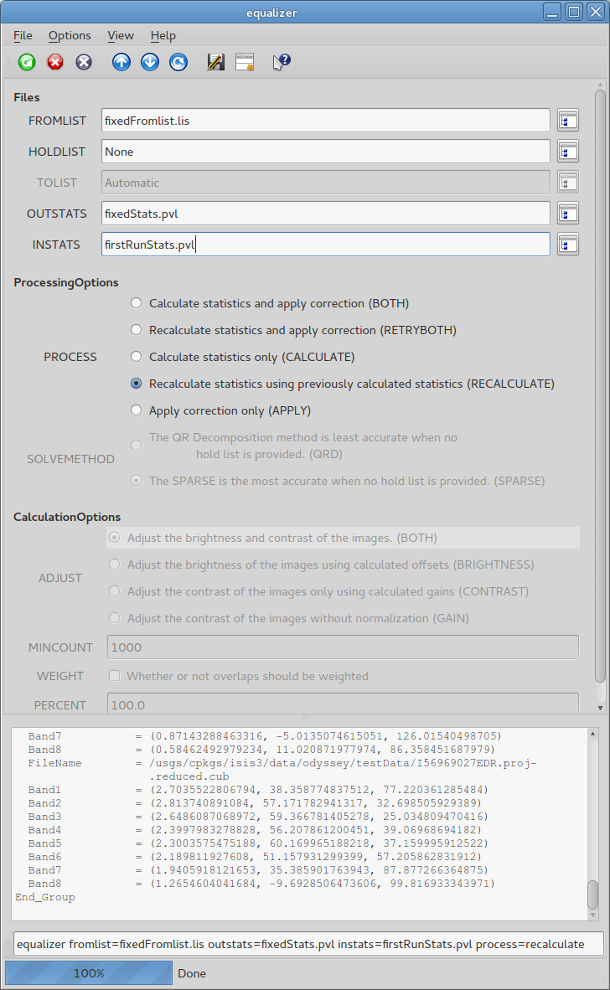
equalizer  fromlist=fixedList.lst
          instats=nonOverlapStats.pvl outstats=fixedStats.pvl process=recalculate
GUI Screenshot
Example GUI
Equalizer GUIScreenshot of the GUI with parameters set to initially calculate statistics for a set of images with non-overlapping images.
Example GUI
Equalizer GUIScreenshot of the GUI with parameters set to recalculate statistics after calculating statistics for a set of images with non-overlapping images.
Input Images
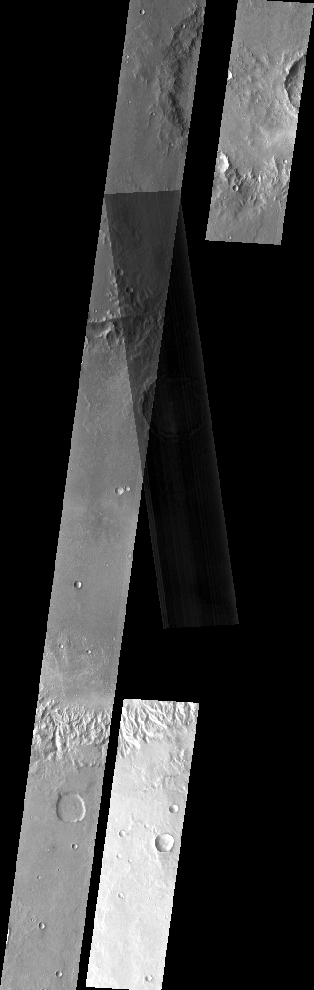
Mosaic of the input images for equalizer for initial calculation
Mosaic of unequalized input images where two images do not have overlapsThis is a small section of the input images mosaicked together. Two of the images do not have any overlaps.
Mosaic of the input images for equalizer for recalculation
Mosaic of unequalized input images where all images have valid overlaps
Parameter Name:
FROMLIST
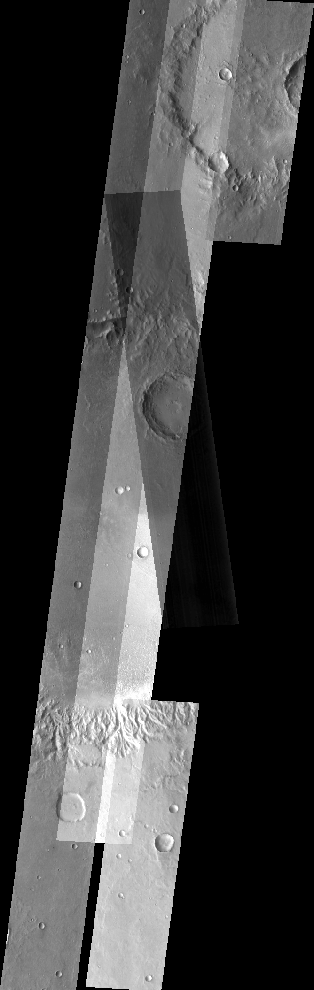
This is a small section of the input images mosaicked together. The non-overlaps have been corrected.
Data Files
Links open in a new window.| Click here to see the list with non-overlapping images used to calculate statistics | This list contains the names of four files where two images do not have any overlaps. |
|---|---|
| Click here to see the corrected list with all overlapping images used to recalculate statistics | This list contains the names of five files that all have valid overlaps. The third file, I50695002EDR.proj.reduced.cub, was added to fix the non-overlapping areas. (FROMLIST) |
| Click here to see the output text file containing the statistics needed for recalculating | This PVL file contains equalization-related statistics where corrective factors have not been determined (since there were images without overlaps). This can be used to recalculate statistics for a corrected input image list. Overlap statistics will only be calculated for new overlaps. (INSTATS) |
| Click here to see the output text file containing the recalculated statistics to be used for equalizing | This PVL file contains equalization-related statistics that were recalculated from a previous run of equalizer. This can be used for applying correction to any or all images used to generate this file. (OUTSTATS) |
Example 5
Recalculate Statistics and Apply Correction (RETRYBOTH)
Command Line
equalizer
          fromlist=fixedFromlist.lis tolist=tolist.lis outstats=retryBothStats.pvl
          instats=nonOverlapStats.pvl process=retryboth
GUI Screenshot
Example GUI
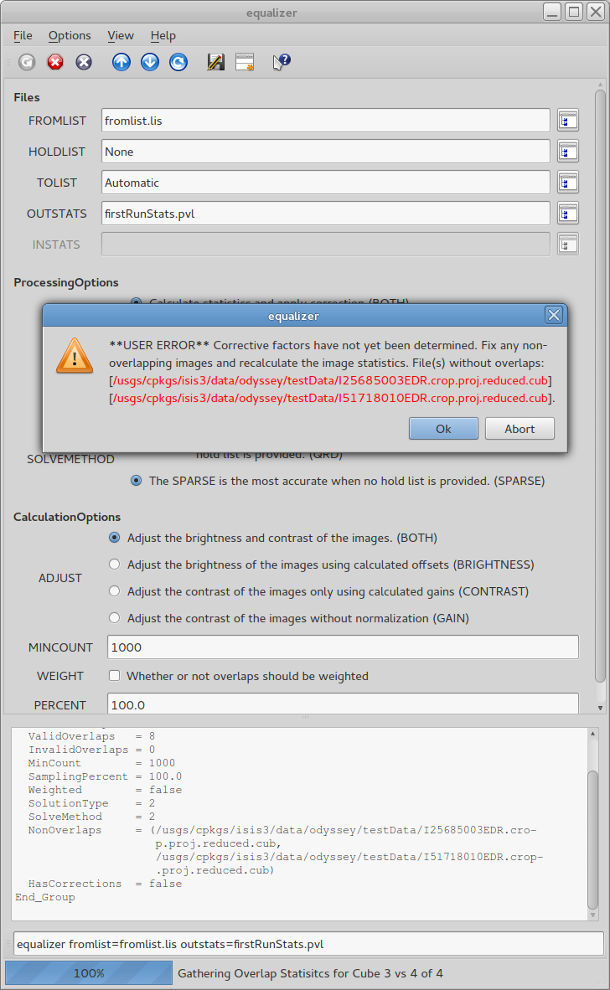
Equalizer GUIScreenshot of the GUI with parameters set to calculate statistics and apply corrections (BOTH). This fails because some of the images do not have any overlaps (see the application log at the bottom of the screenshot).
Example GUI
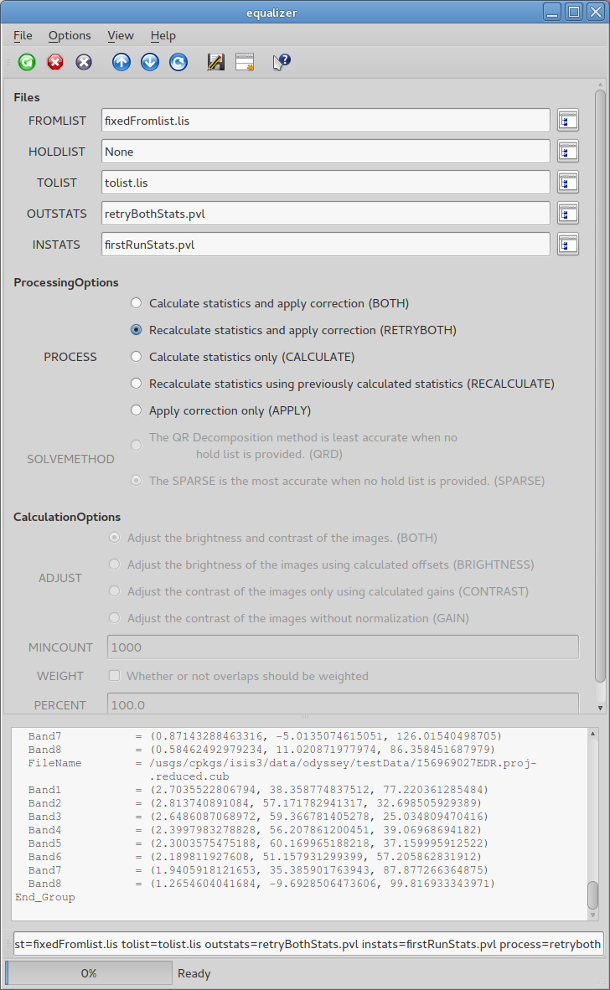
Equalizer GUIScreenshot of the GUI with parameters set to recalculate statistics from previously calculated statistics and apply corrections (RETRYBOTH) to the input images.
Input Images
Mosaic of the input images for equalizer for initial calculation
Mosaic of unequalized input images where two images do not have overlapsThis is a small section of the input images mosaicked together. Two of the images do not have any overlaps.
Mosaic of the input images for equalizer before corrections are applied
Mosaic of unequalized input images where all images have valid overlaps
Parameter Name:
FROMLIST
This is a small section of the input images mosaicked together. The non-overlaps have been corrected by adding I50695002EDR.proj.reduced.cub to the input list.
Data Files
Links open in a new window.| Click here to see the corrected list with all overlapping images used to recalculate statistics | This list contains the names of five files that all have valid overlaps. The third file, I50695002EDR.proj.reduced.cub, was added to fix non-overlapping areas from a previous run. (FROMLIST) |
|---|---|
| Click here to see the list of the output images to be created. | This list contains the names of the five equalized output files that will be created. (TOLIST) |
| Click here to see the output text file containing the statistics needed for recalculating and then applying. | This PVL file contains equalization-related statistics where corrective factors have not been determined (since there were images without overlaps). This can be used to recalculate statistics for a corrected input image list. Overlap statistics will only be calculated for new overlaps. (INSTATS) |
| Click here to see the output text file containing the recalculated statistics. | This PVL file contains equalization-related statistics that were recalculated from a previous run of equalizer. (OUTSTATS) |
Output Image
Mosaic of the equalized output images
Mosaic of equalized output images
Parameter Name:
TOLIST
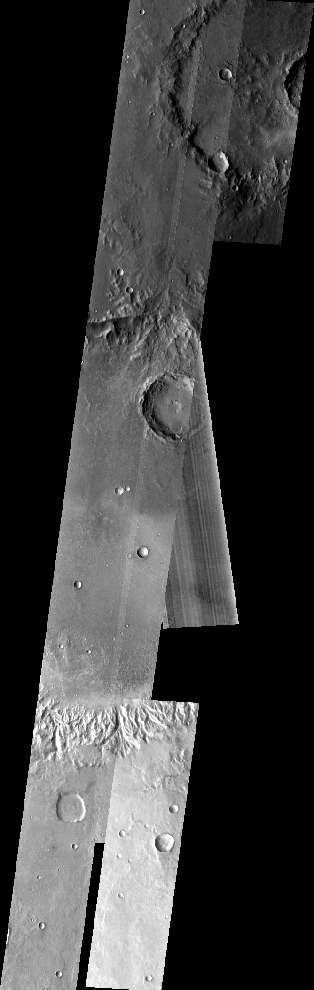
This is a small section of the equalized output images mosaicked together.