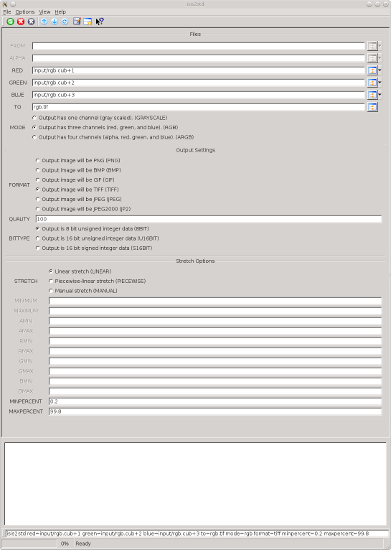
This program exports an ISIS cube to one of several popular standard image
formats. The current supported formats are BMP, JPEG, JP2, PNG, and TIFF.
This program uses TrollTech's version of the Qt Library to export BMP
and JPEG formatted output images. For these format types, due to limitations of Qt, the
input file size must not exceed 2 gigabytes and the only valid output bit type is 8-bit.
The JPEG2000 (JP2) and TIFF formats do not depend on the Qt library. These formats do not
have the 2 GB limitation for input files and the output bit type may be 8-bit, U16-bit or S16-bit.
For these formats, the writing routines output are streamed lines from the cube, and little
of the image is held in memory at any one time, therefore increasing the processing speed to
convert the file. It is recommended that large images are exported to JP2 or TIFF format.
For some output image types, users may specify a value for the level of compression
represented as a percentage using the QUALITY parameter. The default is no compression
(i.e. QUALITY = 100%). For the TIFF format a compression algorithm can be selected.
Each of the input cube parameters (FROM, ALPHA, RED, GREEN, and BLUE) requires a single band
from an ISIS cube. If a cube contains multiple bands, the user must specify a single band of
the input image. To do this, the user must append a plus sign and the band number to be used
to the input file name. For example, inputFile.cub+4 indicates that the 4th band in the cube
will be used. No band needs to be specified if the cube only has a single band.
In addition, if the cube has Mapping labels, the program will produce a world file for use
in Arc and/or other GIS packages. The file will have an extension that uses the first and
last letters for the image extension and a "w". For example, .tif produces a world file
extension of .tfw.
To ensure acceptable contrast in the output file, the user may select from three stretch
options: linear, piecewise-linear, or manual.
Special pixels such as Low Saturation values and Nulls are set to black and High Saturation
values are set to white. See the BITTYPE parameter documentation for more information about
which output pixel values are assigned for particular input DNs of the various bit types.
This program replaces the following
applications
existing in previous versions of ISIS:
| Jeff Anderson | 2005-06-15 |
Original version
|
| Drew Davidson | 2005-06-27 |
Added application test
|
| Jacob Danton | 2006-02-06 |
Added two new modes (rgb and argb) and updated the appTest.
|
| Elizabeth Miller | 2006-05-08 |
Added MIN and MAX percent options
|
| Jacob Danton | 2006-05-22 |
Added seperate MINIMUM and MAXIMUM parameters for all channels.
|
| Brendan George | 2007-05-03 |
Modified to use Filename class, and added appropriate appTest
|
| Steven Lambright | 2007-07-10 |
Modified to give an error if write fails. Memory leak fixed.
|
| Jeff Anderson | 2007-08-20 |
Modified so that ISIS Null pixels are written as zeros in the output cube
and low data in the input is written as a one
|
| Steven Koechle | 2007-08-22 |
Added a check to see that raw image data will be less than 4GB.
Throw exception if it is too big.
|
| Steven Lambright | 2008-05-12 |
Removed references to CubeInfo
|
| Kris Becker | 2008-10-17 |
Added QUALITY parameter to set compression levels
|
| Christopher Austin | 2008-11-04 |
Fixed checkDataSize() since Qimage has a maximum size of 2 GB, not 4GB.
Added some QT error catching.
|
| Steven Koechle | 2009-02-20 |
Documentation Change
|
| Janet Barrett | 2010-01-27 |
Added support for JPEG2000 files.
|
| Stuart Sides and Steven Lambright | 2012-04-03 |
Added minimum and maximum input stretch values and output file
name to the output log. fixes #761
|
| Travis Addair | 2012-04-03 |
Added support for exporting cubes greater than 2GB to TIFFs.
|
| Steven Lambright | 2012-08-28 |
Fixed some problems with the big tiff exports that caused
corrupt outputs. The 2GB limitation should be removed
completely now. References #579.
|
| Jeannie Backer | 2013-06-05 |
Fixed bug where alpha channel was not being utilized for ARGB option. Fixed bug that mapped
Nulls as the min value for TIFF and JP2 formats. Changed ImageExporter calls to new method
names, where needed. Added test for ARGB parameter. Added xml example. Added appTests to
improve coverage for isis2std program and the ImageExporter and its derived classes.
Fixes #1380.
|
| Jeffrey Covington | 2015-02-12 |
Changed default compression of TIFF format images to no compression. Added COMPRESSION parameter to
choose the compression algorithm for TIFF format images. Fixes #1745
|
| Kaitlyn Lee | 2018-02-08 |
Removed the option to export as a GIF because Qt does not support GIF
exports. Fixes #1667.
|